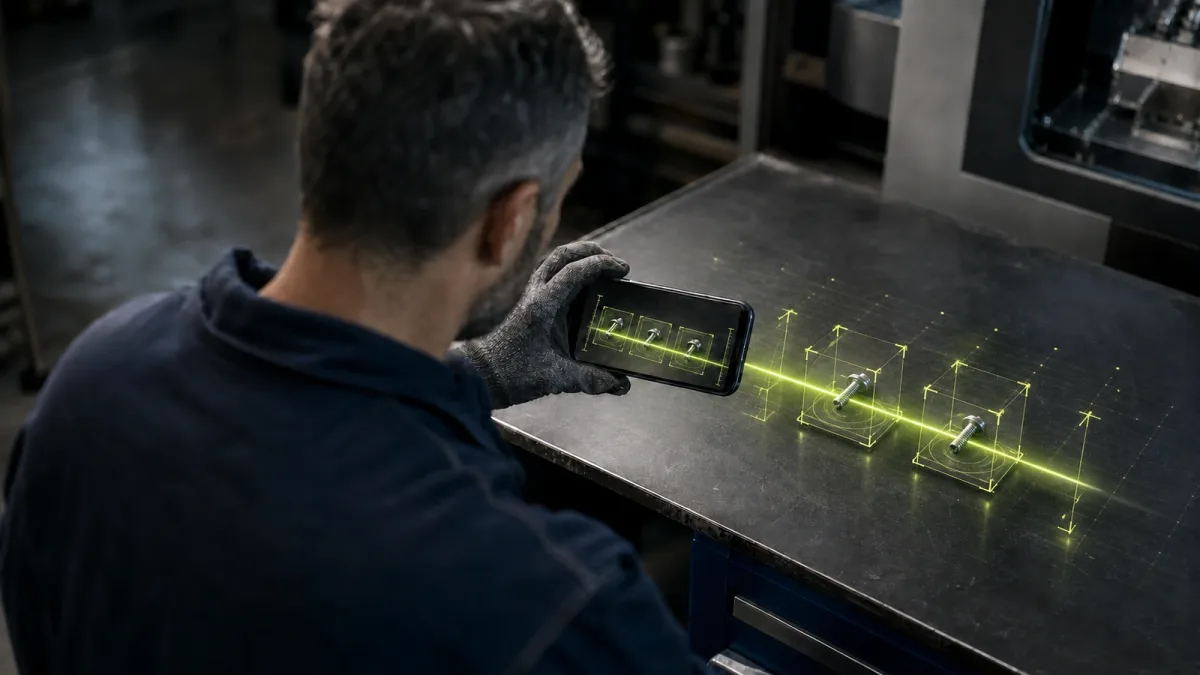
Three screws are lying on a factory floor.
They may be harmless leftovers. They may belong to a machine that was just serviced. They may be the first visible sign that a guard, housing or critical assembly is no longer secured correctly.
Today, resolving that uncertainty often means stopping the job, finding the right manual, searching a catalogue, asking an experienced technician or carrying the parts to someone who might recognize them. The observation is rarely captured in a structured way. Even when the mystery is solved, the answer may disappear into a conversation.
Now imagine the operator takes a photo. A personal, role-aware AI agent compares the image with approved part records, maintenance history and equipment documentation. It returns two likely matches, explains where each is used and asks the worker to confirm the machine location. If the confidence is high enough, it opens a maintenance ticket with the photo, timestamp and part reference already attached. If the situation could affect safety, it escalates instead of guessing.
That is the practical promise of AI agents in manufacturing: not a generic chatbot on the shop floor, but a context-aware assistant that helps each person make a better decision and turns everyday observations into reusable operational knowledge.
The technology is moving quickly. The more important question is whether the factory underneath it is ready.
In brief: Every worker can have an AI agent, but not the same agent. Useful industrial agents inherit the worker’s identity and permissions, understand the plant’s own data and processes, connect to operational systems, and know when a human must confirm the next action.
What is an AI agent in manufacturing?
An AI agent in manufacturing is software that can interpret a goal or situation, retrieve relevant operational context, use approved tools and recommend or perform the next step within defined limits.
That last part matters. A normal chatbot mainly produces an answer. A copilot usually helps a person complete a task. An agent can also coordinate actions: query a machine record, compare a photo with a parts catalogue, create a ticket, notify maintenance and record the result.
Siemens makes a similar distinction between the copilots workers interact with and the agents operating behind them. Its industrial-agent architecture is designed to use specialized tools and other agents, while users choose which tasks to delegate. Siemens also describes an Operations Copilot for shop-floor operators, service technicians and maintenance engineers that can query machine data and provide error-resolution guidance in natural language (Siemens).
The interface may look simple—a phone, tablet, voice assistant or camera—but the useful system behind it is not. A reliable shop-floor AI agent needs six connected capabilities:
- Identity: it knows who is asking.
- Permissions: it only sees data and uses tools that person is authorized to access.
- Industrial context: it understands the company’s machines, parts, procedures, terminology and current operating state.
- Multimodal input: it can work with text, voice, photographs, documents and machine signals.
- Actions: it can interact with approved systems such as an ERP, MES, CMMS, quality platform or knowledge base.
- Traceability: it records what evidence it used, what it recommended, what action followed and who approved it.
Without those layers, “an agent for every employee” is just a chatbot rollout with a more fashionable name.
One company-wide intelligence layer, different access for every worker
A production operator, maintenance engineer and managing director can use the same underlying intelligence without receiving the same access.
The operator may be able to identify a component, retrieve a work instruction and report an anomaly. A maintenance engineer may also see service history, diagnostic values and spare-parts availability. A director may see aggregated performance, cost and planning information but have no reason to edit a machine’s maintenance record.
This is not simply a better prompt. It is an identity and access-control problem.
Microsoft’s enterprise Copilot documentation provides a useful model: the system grounds answers only in content the current user is already authorized to access, while administrators control which agents are allowed and what permissions they require (Microsoft). AWS expresses the same principle more directly for agents: begin with the minimum permissions required for the task and add access only when needed (AWS).
Industrial deployments should go further. Permissions need to cover both reading and doing:
- Which manuals, machine records, quality reports and commercial data can this person retrieve?
- Can the agent create a draft ticket, or submit it directly?
- Can it change a schedule, order a part or stop a process?
- Which actions require a second approval?
- What should happen when the user’s role, shift or site changes?
The safest design is usually assistive first: retrieve, explain, draft and recommend. Action rights expand only after the workflow has been tested with real users, real edge cases and a clear audit trail.
How the loose-screw workflow could work
The photograph is only the first step. A production-ready workflow might look like this:
1. Capture the situation
The worker photographs the screws and speaks a short note: “Found beside line three after the morning changeover.” The system stores the image, location, time, user and machine context automatically.
2. Narrow the possible matches
The agent searches an approved catalogue, recent work orders, equipment bills of material and maintenance records. Instead of declaring certainty, it returns ranked possibilities with confidence scores and the evidence behind them.
3. Ask for the missing context
If two parts look nearly identical, the agent asks for a second angle, a measurement or the machine serial number. It may also check whether maintenance work was completed nearby.
4. Apply operational rules
The system checks whether the possible component is safety-critical, whether the machine may continue running and which escalation path applies. It retrieves the approved procedure rather than inventing one.
5. Let the worker confirm
The operator confirms the location or selects the correct match. Higher-risk situations go to a maintenance engineer or supervisor.
6. Close the loop
The agent creates a structured event in the system of record, attaches the evidence and routes the next task. The original observation no longer vanishes into a chat thread.
That final step is where the value compounds. The worker receives immediate assistance, while the company gains a new data point: an unidentified component was found, at a known location, after a known event, and it led to a known resolution.
This is data activation at the point of work. A photograph and a sentence become operational data that can improve maintenance, quality, training and future agent responses.
Can AI really identify a tiny industrial part from a photo?
Yes—within a defined environment and with the right reference data. But “take any photo of any part and recognize it instantly” is not a responsible production claim.
Industrial parts are unusually difficult for computer vision. Different components can be almost visually identical, while the same component may look different because of viewpoint, scale, grease, wear, background or lighting. A 2026 CVPR workshop paper on industrial spare-part retrieval introduced a benchmark with more than 17,000 object instances precisely because fine-grained matching under controlled and mobile conditions remains challenging (Computer Vision Foundation).
A robust system therefore combines visual recognition with company context:
- the equipment installed at that site;
- the parts approved for that machine;
- recent maintenance and changeover history;
- dimensions or markings supplied by the worker;
- ERP or inventory records;
- a confidence threshold for automatic suggestions;
- human confirmation before a consequential action.
The strongest agent is not the one that answers fastest. It is the one that knows when the available evidence is insufficient.
Six high-value use cases for shop-floor AI agents
The loose-screw example is memorable, but the same architecture supports many workflows.
1. Troubleshooting and fault resolution
An operator describes a symptom in ordinary language. The agent combines the current alarm, machine history, approved documentation and similar resolved cases to propose the next diagnostic steps.
Bosch’s Shopfloor Agent is already focused on this problem: helping production teams identify and resolve machine errors, capture the resulting knowledge and reduce downtime. Bosch reports approximately €850,000 in annual savings per plant in its own use case; that is a vendor-reported result, not a universal benchmark, but it illustrates why troubleshooting is attracting serious investment (Bosch).
The other high-value patterns are closely related:
- Part and tool identification: photograph a component, label, tool or defect; narrow the matches and check compatible assemblies, stock and maintenance records.
- Multilingual work instructions: retrieve the correct procedure revision and explain only the relevant steps in the worker’s language.
- Quality and safety capture: turn a voice note and image into a structured record with the correct product, machine and batch context.
- Maintenance documentation: draft a complete ticket with the symptom, evidence, machine, attempted actions and escalation status.
6. Training and knowledge transfer
The agent surfaces the company’s own proven practices when a less experienced employee needs them. Bosch explicitly frames this as a way to retain knowledge that previously depended on experienced “old hands.” Dassault Systèmes similarly positions manufacturing agents as role-aware companions that reveal relevant expertise and accelerate onboarding (Dassault Systèmes).
This does not eliminate expertise. It makes expertise available at the moment it is needed.
Why most factories are not ready to give everyone an agent
The model is rarely the hardest part. The factory usually has five more basic gaps.
Disconnected operational data
Manuals live in one repository, service history in another, product data in the ERP and practical fixes in people’s heads. An agent cannot reliably reason across information it cannot reach or reconcile.
Unclear sources of truth
If three documents describe three procedures, the agent needs to know which is current and approved. Otherwise it can retrieve the wrong answer perfectly.
Weak identity and permission design
Giving every employee an interface without mapping roles, sites, shifts and action rights creates a security problem rather than an operational advantage.
No connection back to the workflow
If the agent identifies a part but cannot create a traceable record in the CMMS, MES or quality system, the company still loses the observation. The worker has an answer; the operation has learned nothing.
Too much autonomy, too early
An impressive demo can tempt teams to let the agent take action before its limits are understood. In production, consequence matters more than fluency.
The NIST AI Risk Management Framework recommends defining roles for human-AI oversight, documenting a system’s knowledge limits and establishing how humans will supervise its outputs. It also emphasizes understanding the actual deployment context before deciding whether an AI solution is appropriate (NIST).
That is why the work starts on the ground. Frontline employees need to be part of the discovery process, because they know where the process departs from the diagram, which exceptions matter and what would genuinely make the job easier.
A practical rollout: start with one decision, not every employee
The ambition can be an agent for every worker. The first deployment should be much narrower.
- Choose a costly, repeated decision. Look for a workflow where people lose time searching, translating, documenting or escalating, and agree on an operational measure.
- Map the current state. Observe the real people, systems, documents, workarounds and approvals—not just the official process map.
- Define the desired state and boundaries. Specify what the agent may retrieve, recommend, draft or execute, plus the points where a person must confirm.
- Activate the necessary data. Connect and clean what this workflow requires without hiding contradictory sources behind a conversational interface.
- Build the closed loop. Write the confirmed result back to the correct system of record so the interaction improves traceability.
- Test in real conditions. Include different roles, shifts, languages, lighting, damaged parts and ambiguous cases; track both helpful outcomes and overrides.
- Expand by evidence. Scale only after the first workflow creates measurable value, reusing the identity, data and governance foundation.
This diagnosis-first sequence is central to our method: understand how the operation works now, prove value in a bounded workflow, then extend the agentic layer.
Frequently asked questions
What is an AI agent in manufacturing?
It is software that uses plant-specific context, approved data and connected tools to help interpret situations, recommend next steps and sometimes perform controlled actions. Unlike a general chatbot, it operates within a defined industrial workflow and permission model.
How is an industrial AI agent different from a chatbot or copilot?
A chatbot primarily responds with text. A copilot helps a user complete a task. An agent can also plan and coordinate steps across tools—for example, reviewing a machine alarm, finding the relevant procedure, drafting a maintenance ticket and routing it for approval. In practice, the employee may interact with an agent through a copilot-style interface.
Can every factory worker have a personal AI agent?
Yes, provided the system is role-aware. Employees can share the same company intelligence layer while receiving different data, tools and action rights based on job, site and responsibility.
Can AI identify a spare part from a photo?
It can perform well in a constrained environment with a high-quality reference catalogue and operational context. Visually similar parts and poor image conditions still create uncertainty, so production systems should return ranked matches, request more evidence and require confirmation when consequences are material.
Do manufacturing AI agents need to run in the cloud?
No. They can be deployed in cloud, private-cloud, on-premises or hybrid architectures. The right design depends on data sensitivity, latency, connectivity, integration and sovereignty requirements. What matters is that security and access controls apply consistently across the whole workflow.
Will AI agents replace factory workers?
The strongest near-term use cases augment workers: reducing search and documentation time, making expertise easier to access and helping employees act more consistently. Some repetitive steps will be automated, but judgment, confirmation, exception handling and accountability remain human responsibilities—especially in safety- or quality-critical work.
The interface is personal. The intelligence must be operational.
The future is not one all-powerful agent with access to the entire company. It is a governed intelligence layer that meets each worker at the right level, in the right language, with the right context and the right permissions.
For the operator, that may begin with three screws and a photograph. For the company, it can become something larger: faster answers, better records, less dependence on tribal knowledge and a continuously improving view of what actually happens on the shop floor.
But the sequence matters. Start with the decision. Map the work. Connect the evidence. Define the boundaries. Keep people in control. Then scale.
Want to identify the first frontline workflow where an AI agent could create measurable value? Book a free AI assessment.
Sources
- Siemens — Siemens introduces AI agents for industrial automation
- Bosch — The Bosch Shopfloor Agent
- Dassault Systèmes — AI Agents in Manufacturing
- Computer Vision Foundation — Efficient Fine-grained Image Retrieval with Vision Foundation Models for Industrial Objects
- NIST — AI Risk Management Framework Core
- Microsoft — Data, Privacy, and Security for Microsoft 365 Copilot
- AWS — Preventative security best practice for agents